
Velocity · Early access · getvelocityai.app · Steward: LSI Media LLC
One job: get sales meetings booked.
The unified revenue platform: one place to find the right people, reach them with AI-written outreach, book the meeting, close the deal, and keep the customer. Everything in the product exists to feed booked meetings, and a human, or a dial the human set, stands in front of every send.
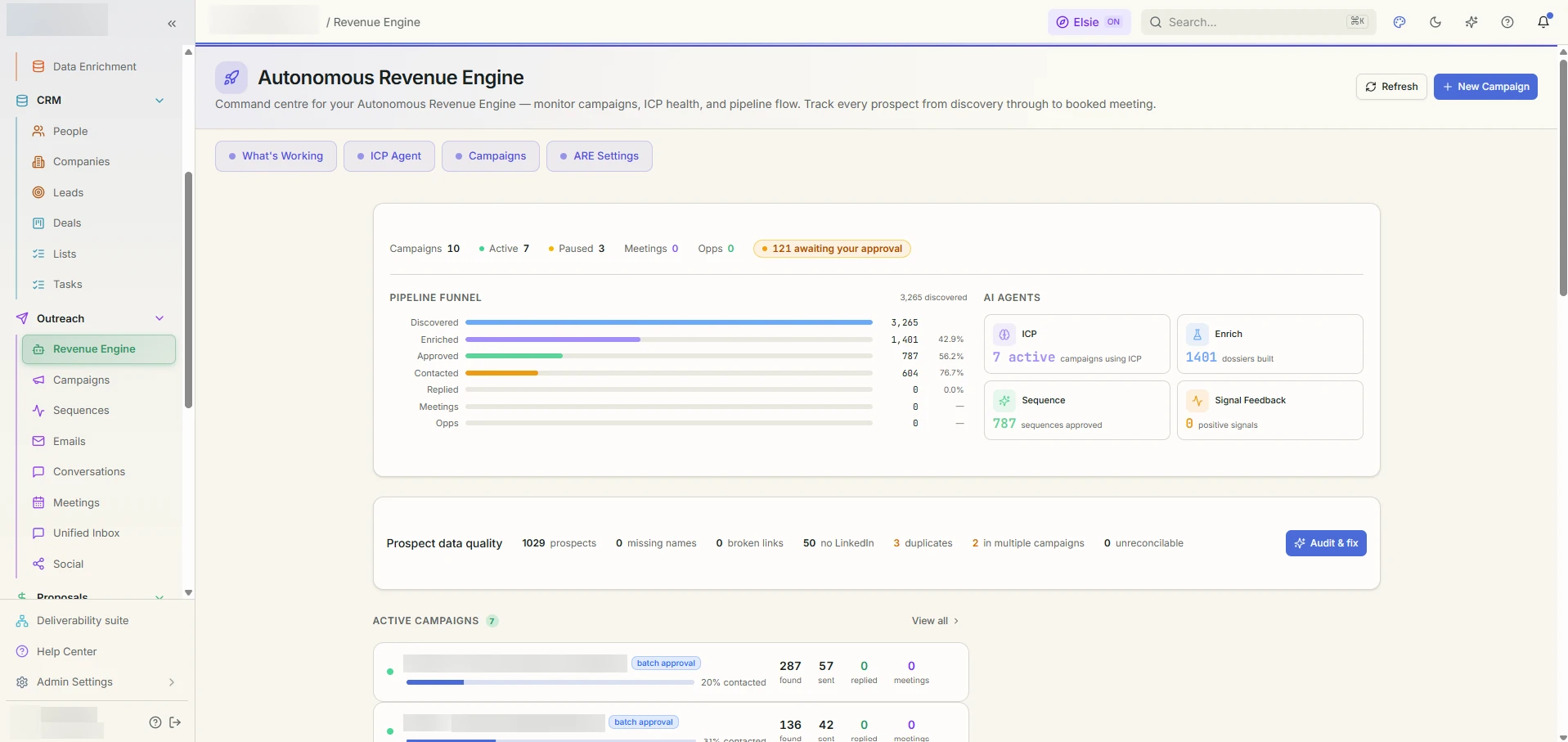
Outreach, with a human or a dial the human set in front of every send.
Inside Velocity
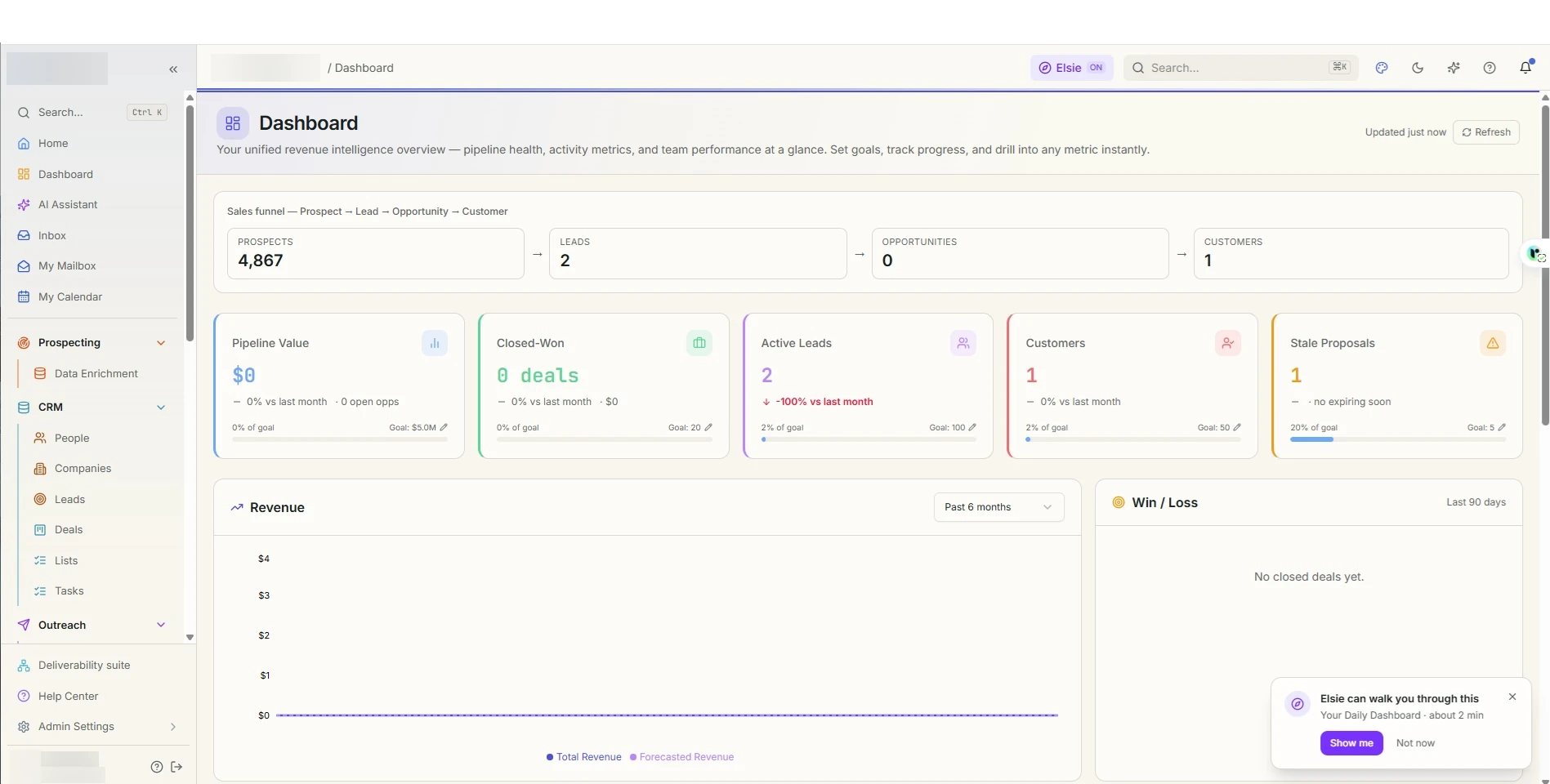
The dashboard.
[9]
Changes shipped this quarter
[78]%
Started as a member’s problem
[5]
Open requests in the queue
[4] days
Request to decision, median
Sample values. Live figures for this product, published monthly. How the scorecard works.
Who it is for
Sales teams, founders doing their own outbound, and agencies running outbound for several clients from one login. Reps who work a queue. Managers who set the dials and read the numbers.
Who it is not for
Customer support teams that need ticketing. Consumer brands sending bulk newsletters. Anyone who wants outreach with no approval step and no sending limits.
Why teams choose Velocity
Meetings arrive five ways
A website chat agent and self-serve booking links book meetings with no outbound email at all. Sequences follow up with people you already have. The Revenue Engine finds new prospects, writes to each one from a researched dossier, sends, and works the replies. Meeting Autopilot proposes and sends invites to prospects who look ready. You choose which to switch on.
One control everywhere: Off, Approve, Auto
Every autonomous feature has the same three-way dial on one screen. Approve is a dry run on your real data: the AI does the work and stops, showing you exactly what it would have said. Nothing reaches a prospect. When you find yourself approving everything unchanged, promote that dial to Auto.
Nothing sends without a human or a dial you set
Every send waits behind an approval queue you can clear one row at a time or with a single Approve all. Cards that send say so before you confirm.
The data explains itself
Every fact on a person or company carries its source and a confidence score. Verified sources replace inferred ones. A pin you set beats every provider.
Home tells you what needs you
One attention panel aggregates every queue waiting on a human: AI drafts, engine approvals, unhandled replies, proposed meetings, draft tasks, routing suggestions, campaign proposals. An empty panel means the machines are handling it.
An assistant that operates the app
Ask it what to do next, have it build lists by criteria, create campaigns and sequences, run reports, queue calls, and approve or send from the queues, all as confirm cards you press.
Watch it work
Ten demos, about two minutes each.
Start with the two-minute tour, then pick the part you care about. The full library adds 25 step-by-step training clips.
 Demo 01 · 1:46
The platform at a glance
| Area | What it does |
|---|---|
| Daily | Home attention panel and 24-hour digest, pipeline Dashboard, AI Assistant, in-app Inbox, your connected Mailbox and Calendar, the Autonomy Center |
| Prospecting | Find Prospects, CSV import with exact-match mapping, enrichment from multiple sources with provenance, Data Health, website visitor tracking, forms, landing pages, AI chat agents |
| CRM | People (the master person record), Companies with brand identity, Leads with scoring and routing, Deals kanban with pipeline alerts, Lists, Tasks |
| Outreach | Revenue Engine campaigns, Sequences, a sitewide Emails log with approval filters, Conversations with reply classification, Meetings with booking links, Unified Inbox and LinkedIn Social |
| Marketing | Broadcasts to segments, rule-based Segments, Segment Rules that auto-enroll |
| Proposals | Client proposals with e-sign and a portal, Quotes with line items, a Products catalog |
| Dialer | Call queue and log, AI voice agents for inbound call-backs |
| Customer Success | Customers with health tiers, Renewals by stage, QBRs with AI prep |
| Analytics | Cross-channel Analytics, a row-level Reports builder with schedules, custom Dashboards, Engine Performance, Forecast |
| Configuration | Sending accounts and sender pools, deliverability, suppressions, connected accounts, LinkedIn limits, lead scoring and routing, brand voice, personas, ICP, prompt templates, workflow rules, custom fields, team, audit log |
What’s inside
Meetings are the job. Everything below exists to feed them.
Find, import, enrich
- Find Prospects searches new people by role and company shape across integrated sources and lands them in People or a list.
- Import brings in CSVs of people, leads or contacts. Column mapping is exact-match, refuses two columns to one field, and enforces required fields per destination, so a bad file fails at mapping time rather than at send time.
- Enrichment fills missing emails, titles, companies and profiles from several sources, reconciled field by field into a provenance ledger. Each fact shows where it came from and how confident the system is. Verification runs through a dedicated email-verification provider.
- Company identification combines LinkedIn and contact-database evidence into a single source of truth for who a person works for. A mailbox domain is never mistaken for an employer.
- Brand identity resolves each company’s logo and domain, and a human pin overrides every provider permanently.
- Data Health surfaces duplicates, gaps and import-mapping problems, and shows what missing data costs in reach.
- Enrichment sweep and company backfill run on their own schedules and caps, filling the backlog without spending more than you allow.
The People database
People is the master record for every human in the workspace: name, title, email and its verification status, LinkedIn, phone, location, company link, confidence tier, fit score, campaign and sequence memberships, activity timeline and the data-source chips behind each field. Filters cover title, seniority, company, email status, confidence, verification state, list and campaign membership. Bulk actions add people to lists, enroll them in sequences, push them into campaigns through a verification wizard, enrich, verify, convert to leads, create tasks or archive.
Inbound capture that sends nothing
- AI chat agents live on your site or on hosted pages. Each has a persona, an opening line, weighted qualifying questions, a threshold, and a knowledge base of facts it may state. It qualifies visitors, captures a routed lead and, in Auto mode, books the meeting itself. A follow-up dial can email visitors who left without booking.
- Booking links let anyone pick a slot on a rep’s calendar and book a real calendar event.
- Forms and landing pages capture leads that auto-create and auto-route, with an optional booking call to action and the chat bubble.
- Website visitors identifies companies and known contacts on your site with intent signals; high-intent known visitors create tasks.
Velocity separates the who from the deal. Accounts and Contacts are durable records that persist across many deals. The Opportunity is the only thing that travels the pipeline and closes Won or Lost. Won turns the account into a Customer with a health score, renewal stage and QBR history.
- Leads are inbound or engaged people awaiting qualification, scored 0 to 100 by a configurable model and routed to an owner by rule. Converting a lead creates the account, contact and opportunity in one step.
- Deals is a kanban by stage with value, win probability, days in stage and next step, plus list and forecast views. Pipeline Alerts flag stale deals, low probability, no champion and slipped close dates. Deal Autopilot writes next-step notes and win probability and, in Auto, creates follow-up tasks.
- Companies hold every person, deal and activity for an organisation, plus enrichment and brand identity.
- Lists are named static sets of people or companies for targeting and bulk work. Segments are rule-based audiences that stay current.
- Tasks hold your queue, including AI-proposed draft tasks awaiting approval, with types for calls, emails, meetings, LinkedIn touches, follow-ups, meeting prep and CRM updates. Overdue tasks fire workflow triggers.
- Activities log calls with dispositions, meetings, emails, notes and stage changes on every record. Custom fields extend any record.
Sequences
Fixed multi-step flows with the same steps for everyone enrolled: email, LinkedIn, task and wait steps, delays, merge tags, subject-line A/B tests. Enroll people or whole lists. Drafts land in an approval filter when review is required. A reply pauses the enrollment automatically.
The Revenue Engine
Autonomous outbound at scale, with a human gate wherever you want one.
- Targeting by titles, industries, geographies, keywords, company size and personas drives discovery and the fit screen. Prospect sources are chosen per campaign; a curated campaign can be told to discover nothing at all.
- Copy per person. The writer reads the prospect’s dossier, your campaign brief, the brand voice and the personas, and writes a sequence for that one person. A judge that sees the same dossier scores each sequence out of 40. A fixed-copy mode is available for templated campaigns.
- The engine loop runs every few minutes: enrich pending people one at a time, best fit first; screen with the fit gate and auto-reject floor; write sequences for approved people; enroll steps on the cadence; dispatch due steps through your sender pool within the daily cap and outside the suppression list; recount; discover more when the queue runs low.
- Autonomy modes: full, batch approval (a human releases each enriched batch), or review and release (a human approves each person’s written sequence).
- People enter by discovery, by the Add existing wizard (select, verify duplicates and other memberships, add), by best-fit campaign routing, or by campaign proposals: on a schedule, people who fit no active campaign are clustered into proposed new campaigns with a name, targeting, a drafted brief and the people list, for you to create, redraft or dismiss.
- Reading a campaign: Prospects, Sequences with quality scores, Step performance as a sortable table and a funnel, A/B variants and promoted winners, Signals for opens, clicks, replies and bounces, Rejections with reasons and one-click restore, Sources, Logs and Settings.
Emails, conversations and meetings
- Emails shows every email in and out sitewide: campaign and sequence steps, CRM sends, inbox mail, proposals, system mail and inbound replies. AI Pipeline and Email Drafts are saved filters where you approve, edit or discard, one at a time or all at once.
- Conversations classifies every inbound reply into eight classes with sentiment, confidence and a suggested reply: willing to meet, follow-up question, referral, out of office, left the company, not interested, unsubscribe, other. Handling a reply stops the sequence for that person. In Auto, a willing-to-meet reply receives your booking link instantly and unsubscribes go straight to suppression.
- Meetings tracks proposed, invited, scheduled, completed, no-show, cancelled and rescheduled meetings, with AI prep on the record, reminders sent automatically, and a re-book task on a no-show.
- Unified Inbox and Social bring LinkedIn, WhatsApp and social DMs into one thread list, with a Social Autopilot for invites and openers inside per-account LinkedIn limits.
Sending done right
Sending accounts for Gmail, Outlook, SMTP and SendGrid, each with a display name that becomes the From header and the signature. Sender pools rotate campaign sends across accounts. Warmup ramps new mailboxes. Deliverability shows domain health, bounce and spam rates. Suppressions are honoured by every sender. Tracking, unsubscribe headers and merge tags are handled at the send boundary.
Every autonomous feature shares one convention, all on the Autonomy Center: Off, Approve (the AI works and stops: drafts, proposals and suggestions, nothing sent) and Auto (it acts and reports afterwards). The dials are admin-only.
| Autopilot | In Approve | In Auto |
|---|---|---|
| Task | drafts next-best-action tasks | opens them |
| Meeting | proposes meetings with candidate times | sends the invite |
| Conversation | classifies replies with a suggested answer | acts per class |
| Deal | next-step notes and win probability | also creates follow-up tasks |
| Social | draft invite tasks | sends LinkedIn invites within caps |
| Job change | re-engagement tasks on a detected move | starts the re-engage sequence |
| Chat agent | captures the lead; a qualified visitor becomes a task | books the meeting |
| Chat follow-up | drafts a follow-up to visitors who left | sends it |
| Enrichment sweep and company backfill | attended runs | unattended, within daily caps |
| Campaign routing and proposals | suggestions on the hub | enrolls best-fit people |
| Optimisation | proposals from outcomes | applies within limits and reverts regressions |
Workflow rules add deterministic if-this-then-that automation on CRM events: record created, stage changed, signal received, deal stuck, task overdue, with actions for webhooks, Slack, Teams, tasks and notifications, and a test-fire that runs the real path. Scheduled jobs drive the engine tick, sequence engine, reply polling, pipeline alerts, warmup, calendar and notes sync, scheduled reports, meeting reminders, daily learning passes, ICP inference and data-quality backfills. Archived workspaces are excluded from all of them.
Reachable from every page with a keyboard shortcut or the top-bar button, with one conversation that follows you. It looks things up, runs read-only queries over every core table, runs and saves reports, recommends with the numbers behind it, asks a focused question with option buttons when a decision changes the outcome, walks you through what it does, and ends every answer with the next step.
- It can propose almost any action in the app: create campaigns and sequences, add batches of people to campaigns, sequences or lists by criteria after previewing the real count, create lists, queue or log calls, update or archive people, pin a company brand, propose meetings, and, through a catalog of every allowed app action, the rest.
- Every action is a confirm card. Sends from the approval queues, such as approved drafts and proposed meetings, are allowed only as cards that say email goes out.
- It never composes and sends arbitrary email, never deletes, and never touches team, credentials, billing or workspace settings.
Analytics and reporting
- Analytics is the one cross-channel funnel: sends, opens, replies, meetings and pipeline created over time and by campaign, sequence or source.
- Reports is a row-level builder over deals, leads, people, contacts, activities and emails, with filters, grouping, sorting, CSV export, saved reports and daily, weekly or monthly email schedules.
- Dashboards hold custom metric boards. Engine Performance shows what the engine sent, booked and learned, by step, source and variant. Forecast projects revenue from the open pipeline weighted by stage and probability.
- Fit scoring models people and companies with a primary model per object. ICP is a living ideal-customer profile regenerated daily from won deals and engagement.
Proposals, quotes and customer success
- Proposals are client-facing documents with sections, milestones, requirements, a share link and portal, e-sign, expiry with extension requests, and a link to the opportunity.
- Quotes price a deal from the Products catalog with line items, discounts, totals and terms.
- Customers track tier, health, ARR and expansion. Renewals walk contracts from 90 days out to renewed or churned. QBRs hold AI-drafted prep and history.
Trust, control and safety
Approval gates everywhere a send happens
Approve all on every approval screen, and cards that state what will happen before you confirm.
Roles
Super admin, admin, manager and rep. Autonomy dials are admin-only.
Audit log
Who changed what and when, including every assistant action.
Provenance
On every enriched field. Low-confidence inferences are labelled and displaced by verified sources.
Suppressions and limits
Suppressions and unsubscribe handling respected by every sender. LinkedIn limits per account. No mode removes them.
Multi-workspace
Several companies on one login, each with its own data, senders, keys, dials and budgets. A monthly AI budget caps spend.
Works with what you already use
Bring your own AI keys per workspace: Anthropic, OpenAI or Gemini. A monthly AI budget caps spend.
GmailOutlook and Microsoft 365: mail, calendar, OneDrive, OneNoteSMTPSendGridLinkedIn via UnipileWhatsApp and social DMsApollo searchQuickEnrichReoon email verificationSlack and Teams via workflow rulesWebhooksHosted landing pages and chat surfacesGrok voice agents
The charter
What it holds, and what it will never become.
Every accepted request for Velocity cites one of these lines. Every decline cites the line it would break. The steward reviews the charter with the community once a quarter.
The opinions it holds
- Meetings are the job. Every feature exists to feed booked meetings. A feature that does not is suspect.
- Nothing sends without a human or a dial. Every autonomous feature has the same three-way control, Off, Approve, Auto, and the dials are admin-only.
- Approve is a dry run on real data. The AI does the work and stops. Promote a dial to Auto only when you find yourself approving everything unchanged.
- The data explains itself. Every fact on a person or company carries its source and a confidence score. Verified beats inferred. A human pin beats every provider.
- Home tells you what needs you. One attention panel for every queue waiting on a person. An empty panel means the machines are handling it.
- The assistant proposes, a person confirms. It never composes and sends arbitrary email, never deletes, and never touches team, credentials, billing or settings.
What it will never become
- A helpdesk. Customer Success tracks health, renewals and QBRs. It does not run a ticket queue.
- A content or social publishing platform. Landing pages, forms and chat agents capture leads. Writing and distributing content is Publisher’s job.
- A bulk-mail cannon. Daily caps, warmup, suppressions and unsubscribe handling apply to every sender. No mode removes them.
- A data broker. Contact data enriched in a workspace stays in that workspace and is never pooled or resold.
- A personal task manager. Tasks here are sales work. Life runs in LevelUp.
What members can ask for
In scope
- A new reply class
- A new autopilot that starts in Approve
- A report or dashboard
- A sending or enrichment provider
- A workflow-rule trigger or action
- A fit-scoring signal
Out of scope
- A ticketing queue
- Removing an approval gate from any send path
- A mode that bypasses suppressions or LinkedIn limits
- An assistant that sends without a confirm card
How it fits the family
The revenue engine. Content that generates inbound comes from Publisher. Demo videos for sequences come from Producer Studio. A rep’s personal planning lives in LevelUp. Workflow handoffs, not built integrations, until the changelog says otherwise.
Early access
What ships before general release.
On 16 August 2026 a read-only deep test covered 71 routes of the production app. It is the kind of report a member-evolved product publishes rather than hides, and it is why the verification stage exists. All 69 library-linked routes loaded without fatal errors and no JavaScript errors were recorded. The remediation order below is the early-access exit list: Velocity is called general release when the top items have shipped, each with its own changelog entry.
| # | Remediation, in order | Severity found |
|---|---|---|
| 1 | Prevent approval of expired meeting proposals and regenerate stale proposals | Critical |
| 2 | Establish one authoritative source and definition for replies, contacts, tasks, deals and won-deal metrics across modules | High |
| 3 | Fix Calendar timezone conversion for new events | High |
| 4 | Correct autonomous job-change task templates and suppress retired or invalid prospects | High |
| 5 | Redesign the People and Calendar layouts below the 1024 px breakpoint | High |
| 6 | Repair navigation from Pipeline Alerts to the referenced opportunity | High |
| 7 | Enforce required fields consistently in the interface and the backend | Medium |
| 8 | Remove deployment and debug details and webhook-registration controls from the production interface | Medium |
| 9 | Deduplicate notification ingestion and rendering | Medium |
| 10 | Address accessible names, dialog descriptions, headings and console warnings | Low |
Test mode was read-only: no records were created, sent, approved, edited or deleted. Progress on each item is posted in the changelog.
The Velocity queue · live
What members asked for in Velocity, and what we did.
| The problem | Raised by | Status | Decided in | Shipped |
|---|---|---|---|---|
| Expired meeting proposals could still be approved and sent, so a prospect could receive an invitation full of past dates. | LSI Media LLC | Shipped | 1 day | 5 Sep 2026 |
| Members who went quiet get the same re-engagement copy as cold prospects, and it reads wrong to someone who already paid us. | LSI Media LLC | Shipped | 5 days | 8 Sep 2026 |
| Home, Analytics and Conversations disagree on how many replies are unhandled, so I do not know which number to work. | LSI Media LLC | Building | 2 days | behind a flag |
| Let the engine skip the daily send cap for a campaign that is converting. Declined by the steward: daily caps, warmup and suppressions apply to every sender and no mode removes them; the charter says so in one line. |
LSI Media LLC | Declined | 1 day | – |
Every request gets a decision within ten business days. Declines are public, with the reason. Shipped entries name the member who asked.
The routine
Ten minutes a day. Forty-five a week. Once a month, promote a dial.
Daily · 10 minutes
Work the Home attention panel top to bottom: AI drafts, engine approvals, unhandled replies, proposed meetings. Read the engine events. Prep today’s meetings. Close the day with touches logged and drafts approved.
Weekly · 45 minutes
Engine Performance and each campaign’s step performance. Campaign health and rejections. Sequences, conversations, data health, pipeline and forecast. Leads older than two days. Inbound, dials and saved reports.
Monthly
Budgets and credit cycles. Recalculate scoring. Review the ICP. Prune. Promote one dial from Approve to Auto. Deliverability, prompts, customer health, hygiene, access, backup.
Full routines, repeatable processes, every page explained, the data model and troubleshooting live in the in-app Help Center’s Operator’s Manual.
Help, built in
Velocity ships its own manual.
- Hover help on every rail item, in a sentence or two.
- An in-app Help Center with an operator’s manual and Ask AI over every article.
- Guided tours and a sample-data workspace for onboarding.
- Every changelog entry that changes Velocity links to the help article it changed.
Velocity is included in every membership, early access and all.
Your subscription funds the team that builds what you ask for. No metering, no credits, no tokens inside the app: it runs on your own AI keys, with a monthly budget you set.