
Publisher · Live · Web app · one workspace per company · Steward: LSI Media LLC
The content engine that runs mostly on its own.
It researches what is worth saying, drafts articles and social posts with their images and SEO, reviews its own work against hard gates, publishes what passes to your website and your social networks on a schedule, and pulls the results back in. Your job is decisions, not production.

Every draft and its next step, on one board.
Inside Publisher
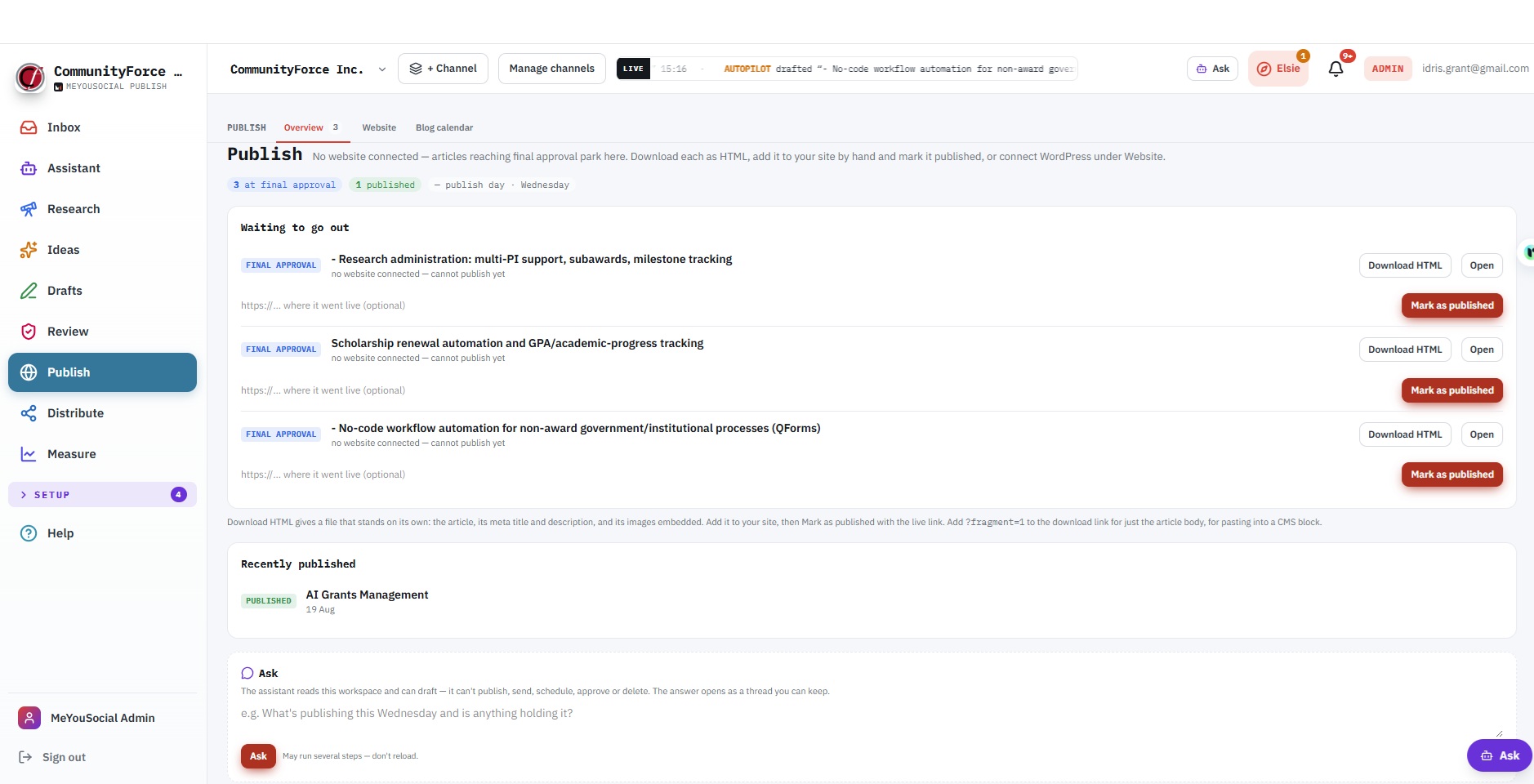
The Publish stage.
[9]
Changes shipped this quarter
[78]%
Started as a member’s problem
[5]
Open requests in the queue
[4] days
Request to decision, median
Sample values. Live figures for this product, published monthly. How the scorecard works.
Who it is for
Companies without a content team, where one person runs a weekly article and a daily social presence in about five minutes a day. Agencies and multi-brand operators with a sealed workspace per client, co-branded, never white-labelled. Creators with a YouTube channel who want scripts, thumbnails, a production board and rendered video in the same loop. Teams that need roles, an approval workflow, function-by-function autonomy dials, an emergency brake and an audit log.
Who it is not for
Organisations that want a digital asset manager. Brands that want paid-ad management. Anyone who wants an AI that writes whatever it is told without sourcing.
One loop, from research to results
A machine with a person at the gates.
Most content tools give you a blank page and a calendar. Every 30 minutes a Publisher autopilot sweep discovers ideas, drafts the ones you approved, gives each article featured and social-preview images and SEO metadata, has a vision model look at every image, sources every flagged claim from live web search, applies the mechanical fixes, advances what passes, publishes on your publish day, writes and queues social posts, recycles evergreen content and syncs your results. Everything it cannot fix parks at a gate for you, with the action on the card.
Research → Ideas → Drafts → Review → Publish → Distribute → Measure
with an Inbox above it that shows exactly what is waiting on you, and Setup beneath it for the dials. An assistant sits on every page and can do nearly everything you can, asking first before anything goes out.
Why it is different
Gates review as well as block
Nothing AI-made reaches an audience until its required checks pass: metadata, slug, focus keyword, alt text on every image, no unsourced claims, every citation verified, a branded social-preview image. Under full autonomy the app does that review work itself and only holds what it genuinely cannot fix.
Claims are sourced, not asserted
The writer marks factual claims. Live web search looks for a real source, and an independent judge has to agree the source actually supports the sentence. Topical overlap is not support. A claim with no support waits for you, with two buttons: verify with a URL, or drop it.
Every AI image is looked at
A vision model inspects each render for cut-off text, wrong brand names and glitches. After two failed renders it stops spending and asks a person.
Never an invented number
A dash means not measured, never zero. Outlier ratios, best time to post, search and engagement figures are measured or absent.
Silence means all clear
If something needs you, admins get one morning digest email listing it. A quiet morning sends nothing, on purpose, so the emails that do arrive mean something.
Bring your own keys, keep your own data
Each workspace runs on its own provider keys, pasted in the app. There is no billing, no credits and no metering inside the app.
Watch it work
Six demos, about two minutes each.
Start with the two-minute tour, then pick the part you care about. The full library adds 12 step-by-step training clips.
 Demo 01 · 2:20
The seven stages
One screen each. A red badge on the strip means a person must act; a muted one is news.
- Intel indexes public YouTube channels by handle or keyword and measures every video’s outlier score: its views divided by its own channel’s average. Five times or more is exceptional, twice is strong, and a dash means not yet measured.
- Bookmarks keep the videos worth returning to. Competitors is the set each channel’s outliers are measured against.
- Make it an idea turns a strong outlier into an article idea in one click.
- Ask about this channel and Ask about this video open the assistant with the stats, outliers and transcript loaded. Paste any YouTube or web link into the assistant for the same treatment, or attach a file.
- One board for article and video ideas, in four columns: Discovered, Approved, Drafted, Rejected, with a format chip on each card.
- Discover article ideas grounded in your company profile, topics and keyword strategy. Generate video ideas per channel. Recompute priorities with every score showing its working.
- Only approved ideas are drafted, and approving is your act. The autopilot never writes from an idea you have not said yes to.
- Keywords: a tiered keyword strategy, discovered by the app or added by hand, that drives idea priority and focus keywords.
- Experts: subject-matter profiles the writing quotes. When an article needs knowledge only you have, the question is asked once, your answer is woven in, and it is banked to the profile.
- Grounded articles, written from your brand context, tone and expert profiles, with a focus keyword, meta title, meta description and slug filled in. Metadata you write by hand is never overwritten.
- Images: a featured image and a branded 1200×630 social-preview image per article, generated from your brand kit and image specs, or uploaded. AI images land as pending for review.
- Optimize: an analysis pass for expertise and trust signals, entity coverage and content gaps. Mechanical findings apply themselves. Knowledge findings ask you a question. Strategic findings ask for a decision.
- A rich editor with versions, citations and a checklist that shows every gate and whether it passes. A board of articles by status, and the article’s own page with body, SEO, images, citations and the Optimize tab.
- The video studio (optional, per workspace): scripts on a chat-driven canvas or a ten-step builder, a Run Agent that takes research to outline to script to QA in the background, thumbnails with a Clone tool that actually looks at your reference image, a production board (Writer’s Room, Film Queue, Edit Bay, Calendar), a teleprompter, voice-over, and rendered video from a storyboard.
- Approvals for social posts when the approval workflow is on: approve, or request changes with a note.
- Questions only you can answer, answered inline in your own words.
- Claims with no source: verify with a URL that genuinely supports the sentence, or drop the claim.
- Images that need your eye: approve, or pick or upload another.
- Held articles, with the failing check named on the card, and Advance anyway for an admin who wants it out regardless. Who, when and why are recorded.
- Audit: refresh, merge and retire recommendations across the archive, so it never goes stale.
- Every clearing act moves the article at once. Answer a question, verify a claim, approve an image, and if that was the last thing holding it, the article advances immediately.
- WordPress connected directly: articles publish on your publish day in your timezone, or on a date you set for a specific article, or right now with one click.
- No WordPress? No problem. Download a self-contained HTML file with metadata, Open Graph tags and images embedded, add it to any site, and mark the article as published with the live link. A body-only fragment is available for CMS blocks.
- Structured data and social-preview tags are written for you. The blog calendar shows what is due and when.
- Fifteen networks through one connection: LinkedIn, X, Facebook, Instagram, Threads, Bluesky, TikTok, YouTube, Pinterest, Reddit, Google Business Profile, Telegram, Snapchat, WhatsApp and Discord. One post fans out to every selected account, and each keeps its own status afterwards.
- Compose once, with per-network text and image overrides where a network needs its own version, character counts against each network’s real limit, and image requirements enforced before you send.
- Posting slots: recurring send times stored as wall clock in your timezone, so 09:00 stays 09:00 through daylight-saving changes. Queue drops a post into the next free slot. Schedule sends once at a time you pick. Post now sends immediately.
- Auto-generated posts from your topics, up to a weekly quota you choose, optionally under a named campaign. Social variants of every published article.
- Approval workflow: pending posts cannot be sent, scheduled, queued or dragged, enforced on the server, not just in the interface. Queue on approval makes approving the last human act.
- Evergreen recycling: a post that performed is cloned into free slots after its cooldown. Opt-in, and a recycled post is never itself recycled. Campaigns with their own tracking parameters, and link tagging for every outbound link.
- A calendar you can drag posts around, a queue in your posting timezone, and recently published with any failed network called out.
- Engage: comments, direct messages and reviews in one place, with the one hard deadline in the app made visible: Facebook and Instagram only accept a DM reply within 24 hours.
- Account health coloured by the network’s own verdict, never by a token-expiry note alone.
- Search: impressions and clicks by week, tracked posts with positions and their deltas, from Google Search Console.
- Traffic: Google Analytics 4, connected once with a service account.
- Social performance by network, synced on a schedule or on demand.
- Best time to post, measured from real engagement, that stays silent below its sample size rather than guessing.
- Reports built from your own data, customisable by block and date range, exported as PDF. Insights for what happened after you published. Blog analytics and a blog report for the article side.
The assistant, everywhere
It can do nearly everything you can. It asks first.
Press the Ask button in the top bar, or Ctrl+/, on any page. The assistant opens as a dock over what you are looking at, knows which page you are on, and can do nearly everything you can do in the app.
It reads everything.
The pipeline, the Inbox, ideas, articles and their checks, social posts, keywords, topics, channels, competitor outliers, connections, dials, results, reports, the live web, and the app’s own guide.
It does the work.
Finds, adds, approves and rejects ideas; discovers keywords and topics; drafts articles and scripts; writes SEO and images; runs Optimize and applies, answers or dismisses findings; verifies or drops claims; approves images; advances an article; drafts, queues, schedules and sends social posts; publishes, exports HTML or records a manual publish; changes the dials, slots, timezone and people; runs the autopilot now.
It asks first.
Anything outward-facing or hard to undo is proposed as “I’m about to… Go ahead?” and runs only when you say yes. Admin-only acts refuse for editors, exactly as the pages do. Every action is written to the audit log, and the steps it took sit under every reply.
It keeps you oriented.
Ask “what should I do next?” and it reads the whole situation and ranks the moves, offering to do each one. When a request is ambiguous it asks, with choices you can tap.
It is the research conversation.
It carries your active channel’s niche, audience, voice and memory, reads Intel channels and videos, YouTube transcripts, web pages and uploaded files, and turns a conversation into a script on the canvas when you say “turn this into a script”.
It will not
enter API keys or credentials, delete a workspace or an account, or send email. Those stay a person’s hands on the page. With no working AI key it refuses the turn rather than guessing.
Control, at the level you want
Function modes
For ideation, drafting, social and publishing: manual (the AI acts only when you click), assisted (it runs and queues at a human checkpoint), or auto (unattended).
Full autonomy
One switch that sets every function to auto, turns queue-on-approval on and remembers what you had, so switching it off restores your previous dials exactly. Under it, the app presses the review buttons a person would. It does not lower what they check.
Global pause
The emergency brake: every AI action stops, manual clicks included.
Targets and cadence
Articles per week, the publish day, social posts per week, SEO on every draft, auto-image, evergreen, and a daily generation budget.
Roles
Admins approve, publish, send and configure; editors write, draft, answer and propose; viewers read. Publishing an article and approving a social post are always an admin’s act.
Workspaces and the audit log
One workspace per company, sealed from every other: keys, accounts, voice, content, slots and dials are its own. Soft limits and usage per person for shared installs. An audit log of everything: what the autopilot did and why, what a person clicked, what the assistant ran and with which arguments.
Brand and voice
Your tone, as editable rules. Not a hidden prompt.
- Seven Motifs: your tone, as editable and versioned rules that every generation blends by weight.
- Brand kit: colours, logo, image dimensions, and whether AI may generate imagery at all.
- Brand context for the AI: differentiators, products and what each does, brand documents, personas. Nothing here is AI-generated, on purpose, because an invented differentiator would be repeated as fact everywhere afterwards.
- Topics the engine writes about, guardrails it must obey, and expert profiles it quotes.
- Co-branding for agencies: upload a client’s logo and accent colour and the app chrome follows, with the product byline kept.
- Elsie, the in-app guide, flags what is still worth setting up and offers short tours: an overview, making content, publishing, measuring, running the install.
Works with what you already use
Every key is pasted in the app, per workspace, without touching a server. Nothing degrades silently: when a provider is missing, the app says so, on the card, in plain words.
| Category | Providers |
|---|---|
| AI writing | Anthropic Claude and Google Gemini, with DeepSeek, xAI, Moonshot and MiniMax keys also accepted. The model is chosen per workspace and per channel. |
| Live web search | Tavily or Serper, for claim sourcing and research |
| Images and vision review | OpenAI gpt-image-1 or Google Gemini image generation. Vision review by OpenAI or Google. |
| Video, shorts, voice | Google Veo renders from a storyboard. Branded shorts through HeyGen. Voice through ElevenLabs. |
| YouTube | The Data API for research and channel linking |
| Social | Fifteen networks through Zernio |
| A connected mailbox through Unipile, for invitations, digests and notifications | |
| Website | WordPress, or HTML export for any site |
| Measurement | Google Search Console and Google Analytics 4 |
| Storage | Local disk or Google Drive, served only to signed-in users |
| API | A read-only API for channels, scripts and ideas, with a per-workspace token |
Setting a workspace up, once
In order; each step unlocks the next. A workspace is one company: its keys, accounts, voice, slots and content are its own, invisible to every other workspace.
| Step | Where | What you do |
|---|---|---|
| 1 · Give it a brain | Publish Admin → API keys | Paste an AI provider key and set the default model to match it. A live web search key (Tavily or Serper) is what lets it source claims. |
| 2 · Connect where it publishes | Settings → Connections | Social accounts (use the app’s Connect buttons), a mailbox, your website under Publish → Website (WordPress, or per-article HTML export), analytics. |
| 3 · Teach it your voice | Brand → Tone & motifs | The seven Motifs, topics, guardrails, and the brand kit: colours, image dimensions, and whether AI may generate imagery. |
| 4 · Tell it what you actually do | Brand → Brand context | Differentiators, products and what each does, brand documents. Every AI feature reads this before it writes. |
| 5 · Set the clock | Settings → Schedule | Timezone and posting slots, the recurring times the queue sends at. |
| 6 · Choose your gates | Settings → People | Require approval holds every social post until an admin approves it. Articles always park at review. Queue on approval makes approving the last act. |
| 7 · Set the autonomy dials | Settings → Automation | Articles a week and on which day, social posts, evergreen, the four function modes, or full autonomy. Start low; raise once you trust what arrives at review. |
| 8 · Wire up measurement | Publish Admin → Analytics | Search Console site and GA4 property, with the service account granted on both. Until then Measure shows dashes. |
| 9 · Invite the team | Settings → People | Editors write, draft, answer and propose; admins approve, publish and configure. |
What it deliberately does not do
- It never publishes, sends or approves anything on its own without the gates passing or a person’s yes.
- It never invents a statistic, an outlier ratio or a best time to post.
- It never overwrites metadata a person wrote.
- It never verifies a claim on a placeholder’s word: with no real search key, the claim waits.
- It never charges, meters or bills inside the app.
- It never removes the product from the chrome: co-branded, not white-labelled.
The charter
What it holds, and what it will never become.
Every accepted request for Publisher cites one of these lines. Every decline cites the line it would break. The steward reviews the charter with the community once a quarter.
The opinions it holds
- Gates review as well as block. Nothing AI-made reaches an audience until metadata, slug, keyword, alt text, sourced claims and a branded preview image all pass.
- Claims are sourced, not asserted. Live search finds a source, an independent judge confirms it supports the sentence, and an unsupported claim waits for a person with two buttons: verify or drop.
- Every AI image is looked at. A vision model checks each render. After two failures it stops spending and asks.
- Never an invented number. A dash means not measured, never zero.
- Silence means all clear. A quiet morning sends no digest, on purpose, so the emails that arrive mean something.
- Approving is a person’s act. Only approved ideas are drafted. Publishing an article and approving a social post are always an admin’s act. Full autonomy presses the buttons a person would. It does not lower what they check.
- Bring your own keys, keep your own data. No billing, credits or metering inside the app. Co-branded for agencies, never white-labelled.
What it will never become
- A generic AI writer. Everything it writes is grounded in brand context, motifs, expert profiles and sourced claims. There is no blank chat box that produces ungrounded copy.
- A paid-ads platform. Organic articles, social and video only.
- A brand-monitoring or sentiment tool. Intel measures competitor video outliers to find ideas. It does not watch the internet for mentions.
- A white-label product. The client’s identity leads. The product stays visible.
- A metered marketplace. No credits, no tokens, no in-app billing.
What members can ask for
In scope
- A new network
- A new gate or check
- A new motif
- A report block
- A CMS export format
- An Optimize finding type
- A research source
- A video-studio step
Out of scope
- An ads module
- White-labelling
- In-app credits
- A publish path that skips the gates
- AI-generated brand differentiators
How it fits the family
The content and distribution layer. It distributes what Producer makes. The leads its content generates are Velocity’s to work. Editorial ideas can start in LevelUp. Workflow handoffs, not built integrations, until the changelog says otherwise.
The Publisher queue · live
What members asked for in Publisher, and what we did.
| The problem | Raised by | Status | Decided in | Shipped |
|---|---|---|---|---|
| The changelog article needs the member’s name and the request thread in a fixed place, and drafts keep putting them in different paragraphs. | LSI Media LLC | Shipped | 3 days | 9 Sep 2026 |
| Social variants go out the moment an article publishes, but the changelog video renders an hour later, so the posts have no video. | LSI Media LLC | Building | 4 days | behind a flag |
| Every claim in a changelog article is about our own product, live search finds no source, and every entry parks at the claims gate. | LSI Media LLC | Planned | 7 days | sprint of 15 Sep |
| Add a paid boost step so the changelog post is promoted on LinkedIn. Declined by the steward: Publisher is organic articles, social and video only; it will never become a paid-ads platform. |
LSI Media LLC | Declined | 2 days | – |
Every request gets a decision within ten business days. Declines are public, with the reason. Shipped entries name the member who asked.
The routine
Five minutes a day. Half an hour the day before publish day.
Daily · about 5 minutes
Read the digest if one arrived; no digest means nothing urgent. Work the Inbox top to bottom: approve or request changes, answer a question, verify or drop a claim, approve an image. Answer comments and messages the day they arrive.
Weekly · about 30 minutes
Triage discovered ideas and keep three to five approved. Read what was drafted, words, pictures and SEO together, and answer the knowledge cards. Approve and queue the social week. Confirm the publish day’s article is at final approval. Glance at social performance. Skim the outliers.
Monthly · about an hour
Read Insights and Reports and decide what to do more of. Tune the Motifs and topics. Reconsider the dials. Check connections, keys, analytics properties and people. Run a content audit.
The routine is a check, not a shift. If you are ever lost, ask the assistant what to do next.
Help, built in
Publisher ships its own manual.
- The owner’s guide: the whole machine on one page, a fifteen-minute read that the assistant knows too.
- A Help Center with role-based paths, searchable answers by category, and keyboard shortcuts.
- Hover help on every rail entry and control, in a sentence or two. Elsie’s short tours.
- A morning digest on the days it matters, and a notifications bell for holds and failures with a link to each. Old links keep working.
Publisher is included in every membership.
Your subscription funds the team that builds what you ask for. No metering, no credits, no tokens inside the app: it runs on keys you paste in, per workspace.