
Producer Studio · Web app at producerstudio.app · Windows desktop app · Built on HyperFrames · Steward: LSI Media LLC
Drop a screen recording.
Get a finished, narrated video.
Producer Studio is AI video production and a full timeline editor in one app. Producer AI turns a screen recording into a scripted, narrated, branded video in one of eight looks, then hands the cut to a multi-track editor where you finish it by hand or by asking. Work in the browser at producerstudio.app, or install the Windows app, which runs transcription, narration and rendering on your PC and syncs your projects with your cloud account.
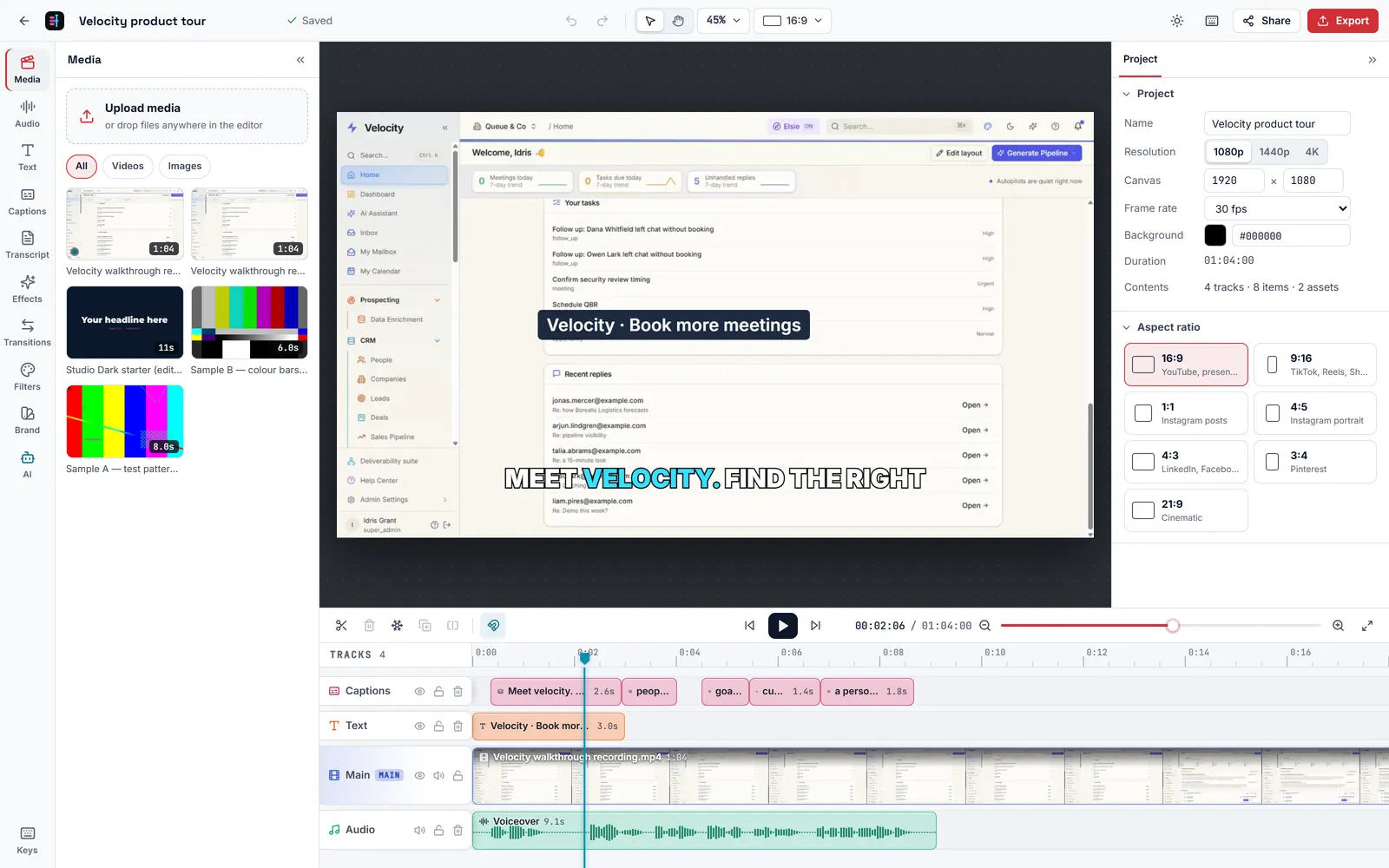
The editor with a Producer AI cut on the timeline: captions, a lower-third title, the recording and the voiceover.
Inside Producer Studio
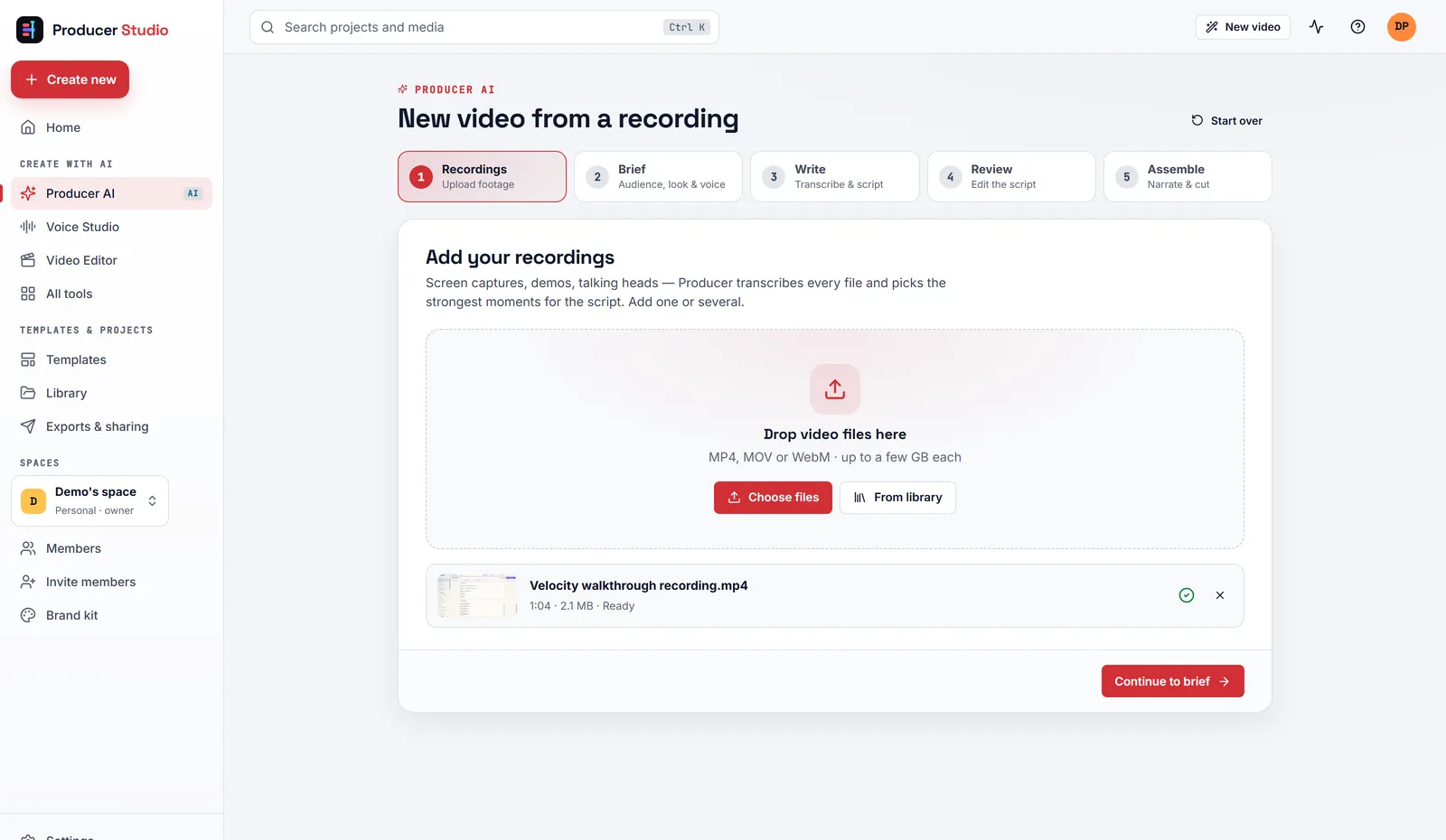
Producer AI: add your recordings and write the brief, and Producer writes, narrates and assembles the cut.
[9]
Changes shipped this quarter
[78]%
Started as a member’s problem
[5]
Open requests in the queue
[4] days
Request to decision, median
Sample values. Live figures for this product, published monthly. How the scorecard works.
Who it is for
Product marketers, sales engineers, founders, trainers, customer success and internal communications teams who have a recording and a message. Agencies and teams producing videos in a consistent house look, with a shared brand kit and templates.
Who it is not for
Multi-camera, colour-graded or long-form film productions. Anyone looking for AI presenters or a stock-footage library. Mac users who want a desktop app: on a Mac, use the web app.
Why Producer Studio exists
A screen recording is evidence, not a video.
Someone still has to decide what the story is, write narration that matches what is on screen, cut around the loading spinners, add titles and captions, and export something people will watch. That is a day of work for an editor, and it is why most product walkthroughs are twelve minutes of unedited screen capture. Producer Studio makes the first cut for you and gives you a real editor for the rest.
The recording is the source of truth
Producer AI writes against the transcript and a contact sheet of frames from your recording. Every fact, number and label in the narration must be visible or said in the recording. Nothing is invented.
A first cut in minutes, not a day
Write a brief, and Producer transcribes, scripts, narrates and assembles the timeline: headlines, captions, footage and voiceover, already in sync. The length of each spoken line sets the length of its scene.
You finish it, by hand or by asking
The cut opens in a full multi-track editor. Trim and restyle it yourself, edit by deleting words from the transcript, or ask the AI assistant in plain English: “tighten the intro.”
Producer AI: five steps from recording to cut
Recordings, brief, write, review, assemble. The brief and the script are yours. Everything between them is automatic, and the result is an ordinary project you can change.
Add one or more screen captures, demos or talking-head videos (MP4, MOV or WebM), or pick them from the library. Producer transcribes every file and picks the strongest moments for the script. Several recordings can go into one video, and the script can cut between them.
The brief is what the script is written against. The more specific it is, the sharper the script.
| Field | What it sets |
|---|---|
| Title | The name of the video and the project. |
| Audience | Who it is for: prospects, new customers, leadership, staff. Free text. |
| Goal | The one message the video must land. It is the spine of the script and lands by scene two. |
| Tone | Confident, Friendly, Professional, Energetic, Calm or Playful. |
| Aspect ratio | 16:9 landscape, 9:16 vertical or 1:1 square. |
| Template look | One of eight looks, from Studio Dark to Social Vertical. |
| Narration voice | One of 24 voices, filtered by female, male, American or British. |
| Notes for the writer | Facts to include, things to avoid, names not to mention. |
Producer transcribes each recording with whisper.cpp, builds a contact sheet of frames, and has the AI write a script: four to ten scenes from one recording, six to twelve from several. Each scene has an on-screen headline, twenty to seventy words of narration written to be spoken, and the footage windows that show what the narration describes.
The script follows a value-first spine: a hook in the viewer’s language, the message by scene two, and every later scene as evidence. Every fact, number and label must be visible or said in the recordings, and blank or loading stretches are left out.
Read the script before anything is voiced. Edit any headline or line of narration, reorder scenes, add a scene or more footage, or ask the AI to rewrite a single scene. A running word count and an estimated length keep the video to the length you want.
Producer narrates every line in the chosen voice and cuts the video to the narration: the real length of each spoken line sets the length of its scene. The result opens in the editor on its own tracks for captions, labels, headlines, the main footage and the audio, ready to adjust or export.
The editor
A multi-track timeline for any video, not only Producer AI cuts. Start a blank project in any of seven aspect ratios (16:9, 9:16, 1:1, 4:5, 4:3, 3:4 and 21:9), or open a cut from Producer AI.
| Panel | What it does |
|---|---|
| Media | Upload video, audio and images and drag them onto the timeline. Reframe for any aspect ratio, change speed, hold a freeze frame. |
| Canvas and keyframes | Position, scale, rotate and fade anything on the canvas, with keyframes for motion. |
| Text | Ten animated presets: Bold title, Editorial, Studio, Lower third, Accent bar, Social pop, Highlight, Big number, Neon and Typewriter. Plus shapes. |
| Captions | Auto captions from the speech, word-timed, in five styles: Clean, Boxed, Karaoke, Word pop and Editorial. Add or fix lines by hand. Import and export SRT. |
| Transcript | Edit the video by deleting words from its transcript. Remove pauses and filler words in one click. |
| Audio | Generate a voiceover from a script at the playhead. Add music beds and sound effects with fades and ducking. Split a clip’s audio onto its own track. |
| Effects | Blur, black and white, vignette, camera shake, zoom pulse, Ken Burns, flash, soft glow, RGB split, VHS and film grain. |
| Transitions | Crossfade, dip to black, flash white, pushes in four directions, zoom through, pull back, wipes, blur dissolve and spin. |
| Filters | Colour looks for a clip or the whole video. |
| Brand | Apply your brand kit: palette, fonts, logo and default caption style. |
| AI assistant | Edit by asking, in plain English. The assistant reads the timeline and makes the change as ordinary edits you can see, adjust or undo. |
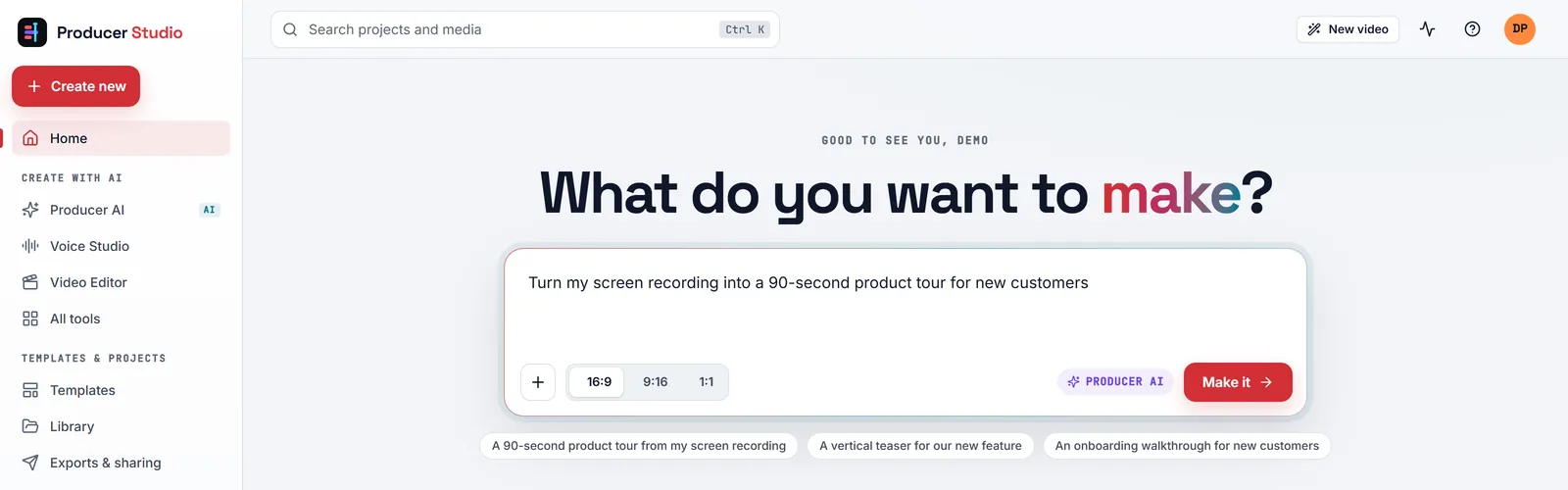
The home screen: say what you want to make, attach a recording, or jump straight to a tool.
Export and share
Rendered at the size you ship, with a link for review.
Exports are rendered by HyperFrames and drawn natively at the output resolution: 720p up to 4K, 24 to 60 frames per second, in Draft, Standard or High quality, as MP4, WebM or GIF.
Every export lands on the Exports page with a share link. Anyone with the link can watch it for review without signing in.
Brand kit, spaces and templates
Built for a team that wants one house look.
- Brand kit: name, colour palette, fonts from a set of twelve, logo, default caption style and default voice. Every new project starts on brand.
- Spaces: a personal space and team spaces. Invite members as Owner, Editor or Viewer.
- Templates: the eight looks, plus team templates. Save any project as a template and start the next video from it.
- Library: every file uploaded to the space, ready to reuse in any project.
The eight looks
Producer AI assembles every cut in one of eight looks. Colours and fonts come from your brand kit, so every video in a space looks like it came from the same studio.
| Look | Aspect | Character |
|---|---|---|
| Studio Dark | 16:9 | Business. Dark canvas, footage in a framed window, a story column of cards. |
| Editorial Light | 16:9 | Editorial. Warm paper canvas, ink type, strong rules. Calm and print-like. |
| Cinema Full-Bleed | 16:9 | Cinematic. Footage fills the frame under a dark scrim; headlines and lower thirds ride on top. |
| Social Vertical | 9:16 | Social. For LinkedIn, Reels and Shorts: footage on top, big type and stacked callouts below. |
| Boardroom Slate | 16:9 | Business. Slate canvas, split screen: large numerals on one side, footage on the other. |
| Sunrise Warm | 16:9 | Warm. Deep plum canvas with warm glows; headline on top, footage centred. |
| Blueprint Grid | 16:9 | Technical. Light grid, mono annotations with leader lines. For engineering audiences. |
| Minimal Mono | 16:9 | Minimal. Black and white, hairline frames, one enormous headline. |
Voice Studio
Twenty-four voices, and a writer for the script.
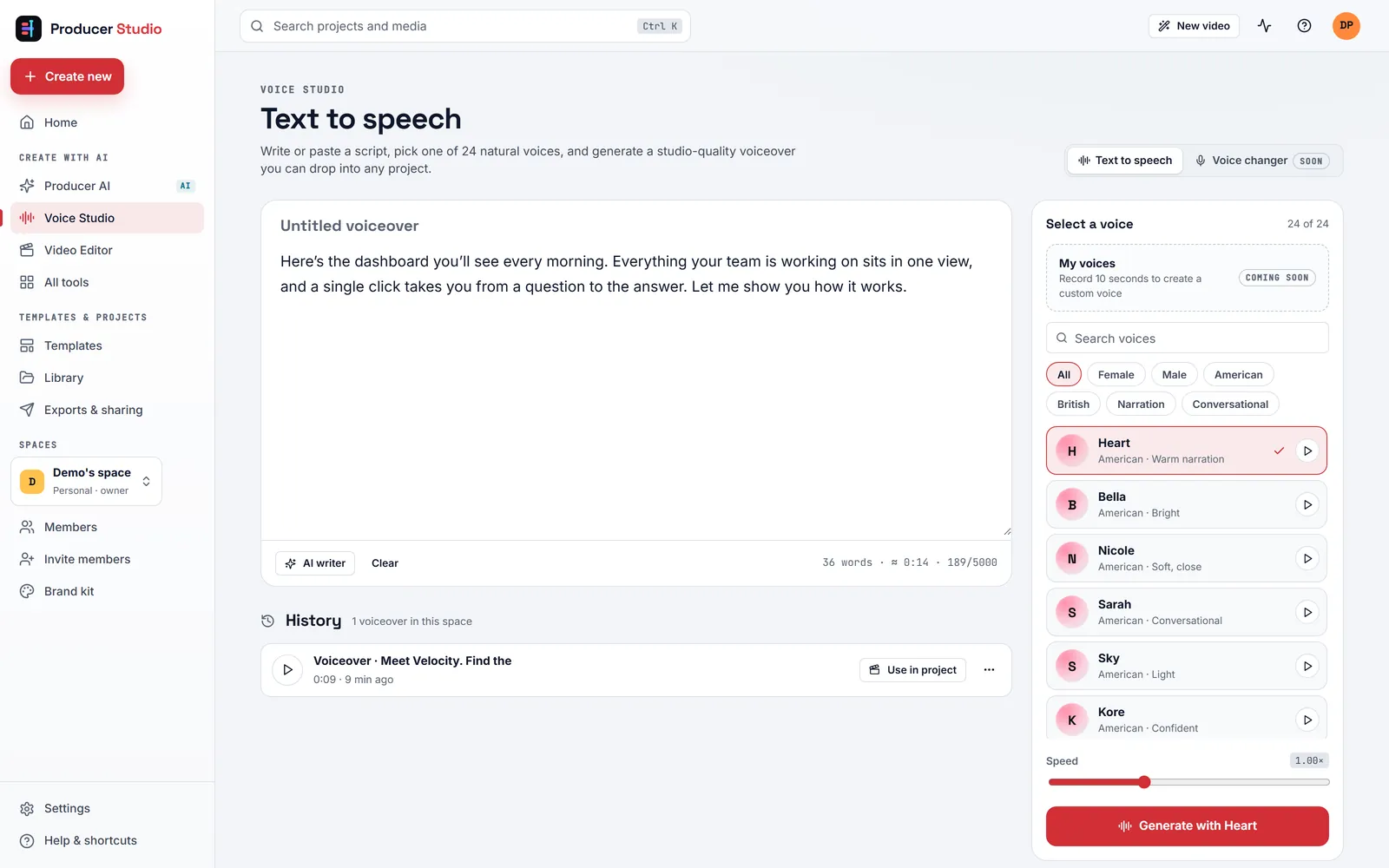
Type or generate a script, pick a voice and a speed, and create natural narration. Every take is kept in the history, ready to drop into any project. The same voices narrate Producer AI cuts and editor voiceovers.
| Accent | Voices |
|---|---|
| American, female | Heart, Bella, Nicole, Sarah, Sky, Kore, Aoede, Nova, Jessica |
| American, male | Michael, Adam, Fenrir, Puck, Eric, Liam, Onyx |
| British, female | Emma, Isabella, Alice, Lily |
| British, male | George, Lewis, Daniel, Fable |
Two editions, one project store
Use it in the browser, or install it on Windows.
Both editions run the same app on the same projects. Open a project in one and carry on in the other.
The web app
- At producerstudio.app, in a modern browser on any computer. Nothing to install.
- Spaces, invites and share links for the whole team.
- AI runs on built-in Claude, or on your own Anthropic, Google Gemini or OpenAI key, chosen per feature.
- Recordings and projects are stored in your space in the cloud; transcription, narration and rendering run on the service.
The Windows app
- A desktop app for Windows x64. Per-user install, no admin rights required.
- The same interface, running on your PC: transcription, narration and rendering happen locally, and exports stay on the machine.
- AI runs through your Claude subscription with Claude Code, or on your own keys. Keys are encrypted on the PC and never synced.
- Link it to your cloud account and projects, brand kits and media sync both ways. Revoke a linked PC from Settings if a machine is lost.
Coming next
Marked Coming soon in the app today. Each arrives through the changelog, like everything else.
Prompt to video Design studio for covers and thumbnails Image templates Remove background Stabilise Batch edit Voice changer Voice cloning
At a glance
| Editions | Web app at producerstudio.app; Windows desktop app that syncs with it |
| Producer AI | 5 steps: Recordings, Brief, Write, Review, Assemble |
| Looks | 8, in 16:9 and 9:16, plus team templates saved from any project |
| Aspect ratios | Producer AI: 16:9, 9:16, 1:1. Editor: 16:9, 9:16, 1:1, 4:5, 4:3, 3:4, 21:9 |
| Voices | 24, American and British |
| Captions | Auto and word-timed, 5 styles, SRT import and export, English transcription |
| Editor | Multi-track timeline, keyframes, 10 text presets, effects, transitions, filters, transcript editing, AI assistant |
| Export | 720p to 4K, 24–60 fps, MP4, WebM or GIF, with share links for review |
| AI | Built-in Claude or your own Anthropic, Gemini or OpenAI key per feature; Claude Code on the Windows app |
The charter
What it holds, and what it will never become.
Every accepted request for Producer Studio cites one of these lines. Every decline cites the line it would break. The steward reviews the charter with the community once a quarter.
The opinions it holds
- The recording is the source of truth. In Producer AI, every fact, number and label in the narration must be visible or said in the recording. Nothing is invented.
- Narration drives timing. The real length of each spoken line sets the length of its scene.
- The person owns the brief and the script. Nothing is voiced until the script has been reviewed, and every cut opens in the editor for a person to finish.
- Every AI edit is an ordinary edit. What Producer AI or the assistant does lands on the timeline as clips, text and keyframes you can see, change or undo.
- Your keys, your choice of model. Built-in Claude, or your own Anthropic, Gemini or OpenAI key, chosen per feature. Keys are encrypted and never shown back.
- One project, either edition. The web app and the Windows app work on the same projects, and a linked PC syncs both ways.
What it will never become
- An avatar or synthetic-presenter generator. Producer Studio makes videos from your recordings and your voiceover. No AI presenters reading your script on camera.
- A video host or analytics platform. Share links are for review. The deliverable is a file; Publisher distributes it and measures it.
- A metered AI reseller. There are no credits, meters or AI markups inside the app.
What members can ask for
In scope
- A template look
- A narration voice
- A text preset or caption style
- An effect or transition
- An export format or preset
- A brief field
- An editor control or shortcut
Out of scope
- AI presenters or avatars
- Public video hosting and analytics
- Credits or metered AI inside the app
How it fits the family
The video maker. Publisher distributes what it produces. Velocity uses the videos in sequences and on landing pages. Production tasks are tracked in LevelUp. Workflow handoffs, not built integrations, until the changelog says otherwise.
The Producer Studio queue · live
What members asked for in Producer Studio, and what we did.
| The problem | Raised by | Status | Decided in | Shipped |
|---|---|---|---|---|
| A release recording has long stretches of a terminal scrolling, and the script treats them as evidence and narrates them. | LSI Media LLC | Shipped | 3 days | 8 Sep 2026 |
| Every weekly changelog video needs the same cold open and close, and I re-type the brief each time. | LSI Media LLC | Shipped | 2 days | in 0.2: team templates |
| Windows SmartScreen warns on every install because the desktop installer is unsigned. | LSI Media LLC | Planned | 1 day | next build |
| Add an AI presenter who reads the script on camera. Declined by the steward: Producer Studio makes videos from your recordings and your voiceover; synthetic presenters are the first thing the charter rules out. |
LSI Media LLC | Declined | 1 day | – |
Every request gets a decision within ten business days. Declines are public, with the reason. Shipped entries name the member who asked.
The routine
Per video, not per week. Most of your attention goes on the script.
Write the brief
Say who it is for and the one thing it should land. Pick the tone, the aspect ratio, the look and the voice, and add notes on what to include or avoid.
Review the script
Read it before it is voiced. Check the facts against your recording, fix a line by hand, reorder scenes, or ask for a rewrite of one scene.
Finish in the editor
Watch the cut, restyle a caption, remove a pause, ask the assistant for a change, then export and send the share link for review.
Everything between the brief and the finished cut is automatic.
Help, built in
Producer Studio ships its own manual.
- Help and keyboard shortcuts sit in the sidebar of every page.
- AI errors say what to fix: a missing key, a quota reached, or a busy service.
- Settings lists your linked Windows PCs, and any of them can be revoked from the cloud.
- Every changelog entry that changes Producer Studio links to the help article it changed.
Producer Studio is included in every membership.
Use the web app at producerstudio.app, or install the Windows app. Members get both, and every new build from the changelog.