
LevelUp · Live at levelupnow.tools · Web app · installable on iOS and Android · Steward: LSI Media LLC
The second brain.
One workspace for everything you’re carrying in your head.
Tasks, notes, projects, goals, habits, journal, calendar, money, sales pipeline, ideas and knowledge, connected to each other, reviewed on a rhythm, and driven by an AI assistant that doesn’t just answer questions but actually does the work. Built by LSI Media LLC.
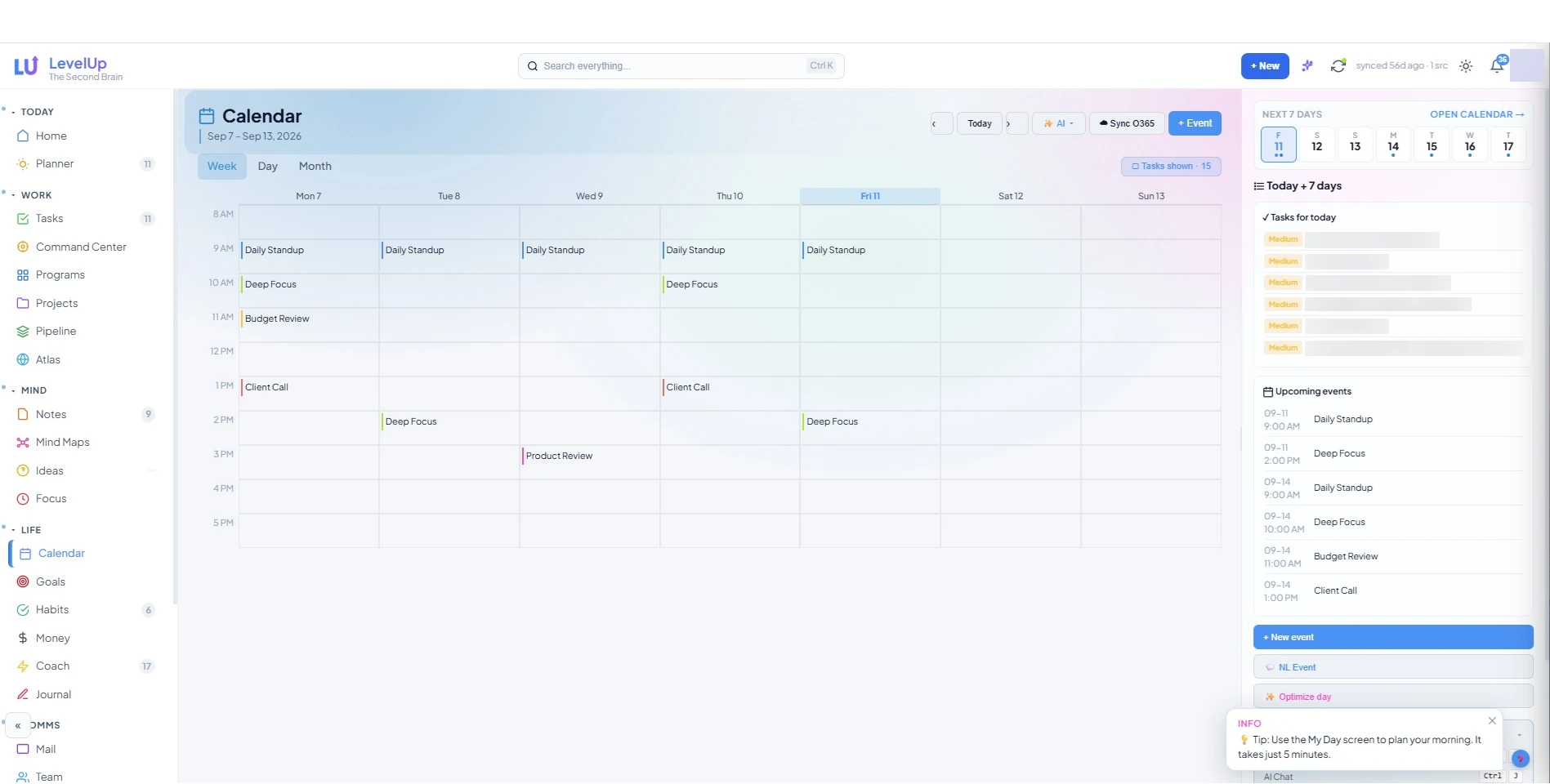
The calendar, with the rest of your life in view.
Inside LevelUp
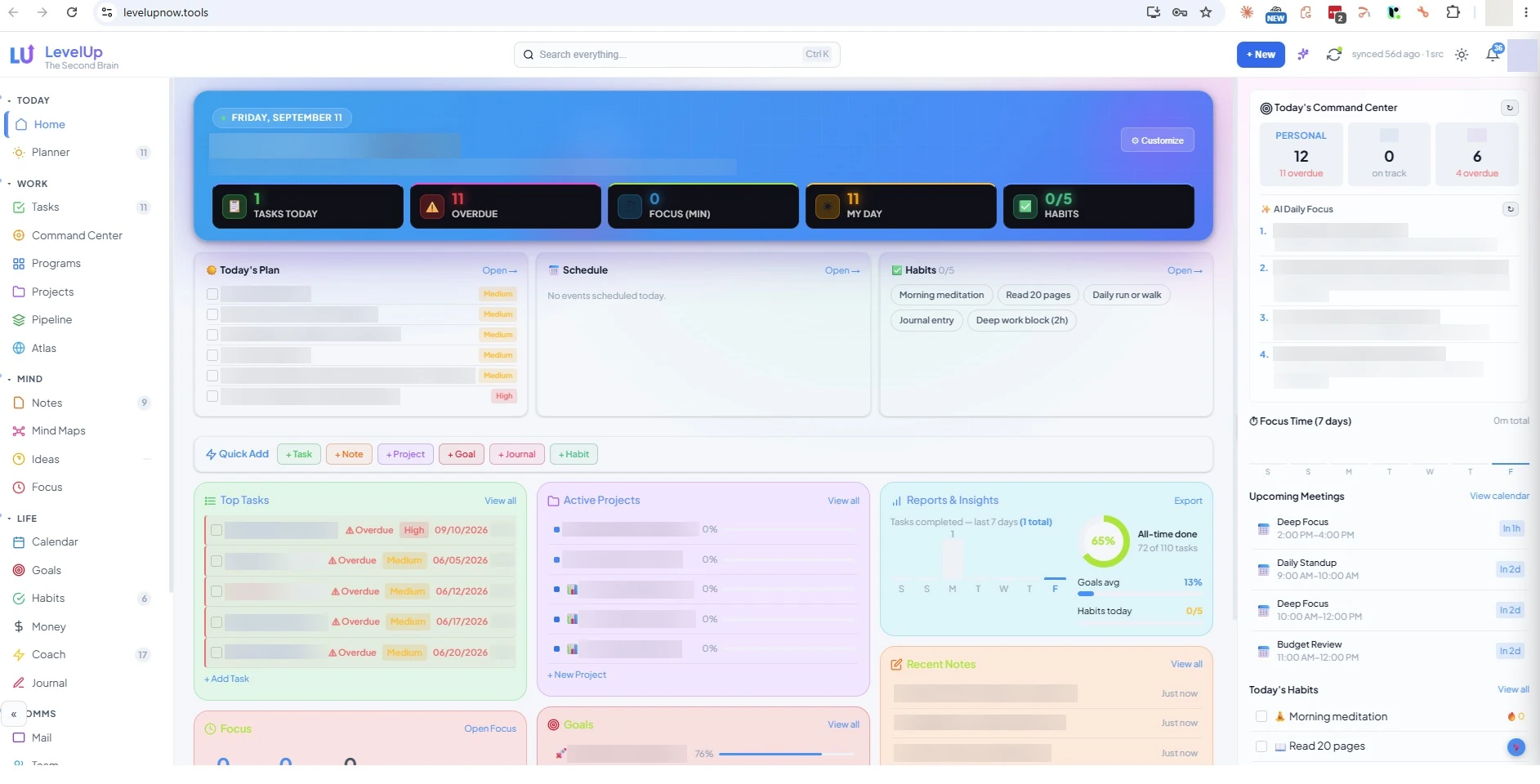
The Home page, where the day starts.
[9]
Changes shipped this quarter
[78]%
Started as a member’s problem
[5]
Open requests in the queue
[4] days
Request to decision, median
Sample values. Live figures for this product, published monthly. How the scorecard works.
Who it is for
The solo operator, founder, executive or project lead who juggles tasks, notes, goals, habits, a calendar, a budget and a small pipeline, and wants one cockpit over all of it. Small teams who share assignments and keep their own workspaces private.
Who it is not for
Organisations that need enterprise resource planning, portfolio governance or time-and-billing. Teams that want a shared sales CRM, which is Velocity. Anyone who wants an app to move their money for them.
Why LevelUp exists
Six tools, six logins, and the real picture scattered across all of them.
Most productivity apps solve one problem and create another. A task manager that doesn’t know your calendar. Notes that never connect to the project they were about. A budget in a spreadsheet nobody opens. LevelUp is built on three ideas, and every page follows from them.
Capture is cheap, sorting is deliberate
Getting a thought in takes two seconds: a keystroke from any page. Deciding what it means happens later, in a review, when you have the whole picture in front of you.
Links are the point
A task, a note, a meeting, a goal, a project and a contact can all reference each other. A pile of items is a to-do list. A linked pile is a second brain, and it is what makes the AI genuinely useful, because it can follow the threads.
Reviews keep it true
A workspace nobody reviews becomes a graveyard within a month. LevelUp builds the daily, weekly and monthly rhythm into the product itself, with guided tours, a Routines section in Help, and an assistant that can run the review with you.
What’s inside
Thirty-two pages, organised into six groups in a collapsible sidebar. Nobody uses all of them, and that is what the detail dial is for.
| Page | What it does |
|---|---|
| Home | A dashboard you build from 28 widgets: Today’s Plan, Top Tasks, Upcoming Deadlines, Goals, Habit Heatmap, Mood Trend, Money Snapshot, Focus, Weather, Quote of the Day, On this day, AI Insight, Productivity Score, Task Velocity, Peak Focus Hour, Stale Content, Tag Cloud, recent Notes, Files, Bookmarks and Mind Maps, Pinned items, Reports, Week Ahead, Upcoming Meetings and more. Drag to reorder. A hero KPI strip and a Today’s Plan strip sit above it. The layout can shift by time of day. |
| Planner (My Day) | Today’s tasks, schedule and habits in one column. A capacity indicator compares the hours you have planned against the hours actually free after meetings, and says so plainly when you are over. Pick three tasks. Run AI Smart Plan to time-block them around your calendar, then apply the plan to the calendar in one click. |
| My Week / My Year | The wider planning horizons. |
| Page | What it does |
|---|---|
| Tasks | The workhorse. Six views: List, Board (kanban), Matrix (Eisenhower), Gantt, Cards and Clusters. Priority, status, due and start dates, times, estimated and actual minutes, energy level, context, location, recurrence, snooze, reminders, tags, subtasks with their own notes, predecessors, linked notes, goals and opportunities, comments, and assignment to teammates with a primary responsible. Quick-add with natural-language syntax. Bulk actions. Saved filters. Time tracking against every task. Tasks pulled from Smartsheet and Nifty appear alongside your own, with two-way status sync and a push queue. |
| Projects | Multi-task efforts with milestones, percent complete, colour, area and owner. A health strip shows velocity, burn, risk and ETA computed from the actual tasks. Views: List, Kanban, Gantt and Workload by assignee. Custom fields. A per-project AI Coach returns a health verdict, blockers with reasons, the next milestone and three recommended focus items. Projects can be auto-created from a Smartsheet hierarchy and linked to a program. |
| Programs | Portfolios of projects with a roll-up health strip and a Portfolio Timeline of every dated task across the program. |
| Command Center | The cross-tool view of what is on fire. Switch hats (all work, one company, personal). KPI strip: overdue, due today, stalled, shipped this week, open total, pending push, time tracked. An at-risk feed, work by stakeholder, work by project, recently shipped. Saved views. An AI Portfolio Briefing (headline, wins, risks, blockers, next three) you can email to yourself. |
| Standup | Yesterday / Today / Blockers, generated from your data, copied as Markdown in one click. |
| Dependencies | A directed graph of task predecessors with layers, status colouring and a critical-path toggle. |
| Pipeline | Sales opportunities in Kanban, Table and Forecast views, with weighted value by stage, win rate, past-close warnings, and a Reports tab: by customer, stage aging, quarterly booking, and coverage against a quota. Per-deal AI next steps become tasks in one click. Syncs from a Smartsheet pipeline sheet. |
| Clusters | Thematic groupings that cut across projects. |
| Process (GTD) | Inbox, clarify, organise. The weekly sort-out lives here. |
| Atlas | A read-only mirror of an external resource planner, with kanban, classification and annotation views. |
| Page | What it does |
|---|---|
| Notes | A rich-text knowledge base with [[wiki-links]], folders, tags, colours, pins, stars, thumbnails, backlinks, word count and reading time. Note types include Meeting Notes (attendees and action items that become tasks) and Decisions (context, choice, rationale, expected and actual outcome). Notes link to the calendar events they were taken in. Import Word and PDF documents in bulk with the original preserved and viewable alongside the extracted text. Sync a OneNote section. Clip web pages. Dictate by voice. AI Deep Insight on any note: summary, key points, action items you can turn into tasks, open questions and related notes. |
| Sheets | Smartsheet-style spreadsheets with a formula engine, typed columns, themes, CSV export and co-editing. Nine templates: Project plan, OKRs / Strategy, Roadmap, SWOT analysis, Risk register, Decision matrix, Budget tracker, Content calendar and blank. |
| Slides | A presentation builder with text, shapes, images, charts, tables, kanban boards, bullet lists, metrics and progress bars, plus a full-screen Present mode. Fifteen templates across four business categories: Pitch deck, Sales deck, Company profile, Marketing plan, Product roadmap, Project review, Project kickoff, Strategy / OKRs, Executive briefing, Agency portfolio, Onboarding / training, Instructional, Webinar and more. |
| Mind Maps | Free-form node-and-edge maps with editable connections (style, arrows, thickness, labels), templates and team sharing. The assistant can build one from a sentence. |
| Ideas | An idea lifecycle: Spark, Develop, Stress-test, Verdict, with guided questions at each stage, ICE scoring (yours and the AI’s), a pre-mortem, and promotion to a project when it earns it. Parked ideas get a review date. |
| Knowledge Graph | A force-directed graph of every note link and shared tag. Click a node to open it. |
| Focus | A pomodoro timer with session history and peak-hour detection that feeds the Smart Plan. |
| Page | What it does |
|---|---|
| Calendar | Week, Day and Month views. Drag to reschedule. Time-block tasks directly onto the grid; scheduled tasks appear alongside events. Create events in natural language. Syncs with Microsoft 365 and Google Calendar, and can push AI-planned focus blocks back to them. Bills show as chips on their due dates. |
| Goals | Outcomes with progress percent, milestones, linked tasks, a target metric and unit, and categories. Check-ins record progress, blockers and next steps, and write a journal entry automatically. Progress history charts. AI progress narrative, weekly review and OKR alignment. |
| Habits | Streaks, a 30-day heatmap, daily, weekly or custom cadences, reminders, skip-today, and per-habit notes. A closest-to-breaking-the-streak nudge on Home. Cadence-aware streaks: daily habits count consecutive days, weekly habits count consecutive weeks with enough completions. |
| Journal | Dated entries with mood and energy, guided prompts (focused, energising, learned), highlights, challenges, gratitude, sleep and exercise. Mood trends feed Reports. AI reflections and weekly summaries. Export. |
| Money | A complete personal-finance system, not a widget. Ten tabs, bank sync, four agents and sixteen reports. Detailed below. |
| Coach | An AI coaching thread over your own data for when you’re stuck. |
| Page | What it does |
|---|---|
| A connected inbox (Microsoft 365, Google, or any IMAP/SMTP account) with AI triage, drafting and follow-up suggestions. | |
| Team | The workspace roster, activity feed, member stats and invitations. |
| Contacts | A lightweight CRM with import from Microsoft 365 and Google, tags, notes and enrichment. |
| Page | What it does |
|---|---|
| Reports | Build your own dashboards. Eleven data sources (tasks, habits, goals, journal, projects, ideas, bookmarks, focus, all work including external tools, external tasks, time tracked), eight visualisations (KPI, bar, line, donut, heatmap, sparkline, progress, table), filters, grouping by any field or by day, week or month, and per-widget date ranges. Thirty ready-made templates from Tasks Completed by day to Time by Hat. An AI widget builder turns a sentence into a widget. Pin widgets to Home. Save named reports. Schedule any report by email. |
| Bookmarks | A link library with fetched metadata, tags, and links to notes, tasks, projects and goals. |
| Archive, Help & Learning, Settings | Help & Learning holds 60 articles, 5 guided tours, in-app search and an AI answer box. |
Money
A complete personal-finance system, not a widget.
Ten tabs: Overview, Income, Transactions, Budgets, Bills, Accounts, Goals, Forecast, Agents and Reports. Private by default: not visible to admins, not to anyone you have not explicitly shared a budget with.
- Accounts of every type: checking, savings, credit, loan, investment, cash, with APR and limits.
- Bank sync through SimpleFIN Bridge. One connection covers every institution, with automatic daily pulls.
- A rules engine that categorises payees automatically, including regex patterns. AI auto-categorisation of everything uncategorised. CSV import with column mapping, split transactions, cleared-flag reconciliation and recurring-charge detection.
- Budgets with a per-month plan, income streams with expected versus received, and bills with due-day, autopay, auto-matching to bank transactions, price-increase alerts and one-click mark paid.
- A 12-month forecast, per-debt payoff plans with APR amortisation, and a debt what-if simulator: snowball versus avalanche.
- Four agents that run daily and surface findings into the notification bell, with AI deep-dives: Smart Bill Manager, Budgeting Agent, Investment Assistant and Financial Health Monitor.
- Sixteen reports, each with an AI insight: Monthly summary, Budget variance, Spending by category, Spending trend, Income vs expenses, Income by stream, Debt overview, Debt payoff order, Upcoming bills, Largest expenses, Net worth statement, Year-to-date, Savings goals check, Fixed vs flexible, Credit utilisation and Category trend explorer.
- Net-worth history, savings goals, and a right rail with month status, bills due and a free-form Ask about your money box.
- Sharing: share a whole budget with a specific person, view-only or edit. Nobody else sees it.
- Never a bank. Money reads accounts through a read-only bridge. It never initiates a payment or a trade.
The assistant that acts
Say it in plain words. Approve the card. Done.
Open it from any page with Ctrl or ⌘ J, the ⚡ button, the ✨ menu in the top bar, or the command palette, and say what you want.
It creates things.
Tasks with subtasks. Projects with their first tasks, inside a program. Notes, mind maps, ideas, goals with milestones, habits, journal entries, contacts, pipeline opportunities, calendar events and focus blocks.
It works with your money.
“Log $42 at Costco under groceries.” “Add the internet bill, $80 on the 15th.” “Am I over budget anywhere?” “Mark rent paid.”
It moves things along.
Completes tasks, checks in on goals, ticks habits, advances a deal to the next stage, moves an idea from Spark to Develop.
It connects things.
Task to note, task to goal, note to project, project to program, in both directions.
It builds reports.
“Add a widget showing overdue tasks by project as a donut.” Saves the layout under a name. Opens any saved or Money report. Summarises what the numbers say.
It tells you what to do next.
“I feel behind, help me get back on track” reads your overdue list, today’s capacity, goals, habits and bills, recommends one concrete next step, and offers to do it.
It never guesses.
If a detail is missing it asks, with tappable options. Every change appears as an Approve these actions? card before it runs. Untick what you don’t want. Deletes always ask, even with auto-run on. Every change has an Undo. Names work anywhere an id would, and when two things match it shows you the candidates instead of picking one.
It knows the product.
Ask how to run a weekly review and it answers from the Help Center, naming the page and the keystroke, because the Help Center is its knowledge base. A second surface, Ask LevelUp (Ctrl+/), searches everything you have captured and answers with numbered citations that open the source item.
Forty-five assistant actions cover every entity, Money, reports, linking, navigation and the workspace. Bring your own key for every AI feature: OpenAI, Anthropic Claude or Google Gemini. Keys are shared at the workspace level and never leave the server. A default output length (short, medium, long) applies everywhere the assistant writes, with a per-editor override.
Make it yours
Nobody uses all thirty-two pages. Everything can be hidden, re-ordered or re-coloured, and nothing is ever deleted.
The detail dial
One control, five stops: Essentials (5 pages), Simple (7), Balanced (11), Full (20), Everything (25). Pages are hidden and come back with a click.
Role presets
Everything, Focused, Balanced, Executive, Project Manager, Creator, Personal. Each a starting layout you then adjust page by page.
Every page is customisable
Show or hide any page, its right rail, and each section in that rail. Home and Tasks have their own widget pickers with reordering. A Customize this page button lives in every rail. Layouts follow you between devices.
A guided setup
New members get a five-step wizard (detail level, preset, sidebar) and then a tour. Workspace owners can publish a team starter layout so every new teammate begins the same way.
Themes
Eight presets, fourteen granular colour pickers, twenty-four per-page accent colours, saved profiles and a time-of-day scheduler. Four designed directions on top: Aurora Glass, Daybreak Pop, Chromatic Bento and Electric Ink. Dark and light with one click. Compact mode. Display scale.
Keyboard-first
Ctrl/⌘ K command palette for navigation, creation and tools. Ctrl/⌘ J assistant. Ctrl/⌘ N quick capture. Ctrl/⌘ / Ask LevelUp. ? shows every shortcut. Universal search across everything from the top bar.
Built for teams, careful about privacy
Everyone sees their own items plus what is assigned to them.
- Invite teammates; assign tasks, projects, programs, mind maps, notes and reports to one or several people with a primary responsible.
- Everyone sees their own items plus what is assigned to them, and what they have delegated out. Only the workspace owner sees everything. Admins can take ownership or delete shared items, but get no default visibility into a teammate’s workspace.
- Share notes, sheets and decks with a single person, with view or edit rights, or with everyone.
- Money is never visible to anyone you have not explicitly shared it with. Not even admins.
- Sign in with email and password or Microsoft 365. Sessions are cookie-based and expire.
- Switching accounts on a shared computer wipes the previous account’s local cache before anything loads.
Works with what you already use
Automation rules run every fifteen minutes: when a task goes overdue, is completed, or an external status changes, add it to My Day, tag it, or change its priority. A daily digest and a weekly review email, with an AI reflection, three picks for the week, and a money block with bills due and budget status, arrive on the schedule you set.
| Integration | What it covers |
|---|---|
| Microsoft 365 | Sign-in, calendar, mail, contacts, OneNote, multiple accounts |
| Calendar, mail, contacts, Drive file storage | |
| Smartsheet | Two-way task sync, hierarchical project import, pipeline sheets |
| NiftyPM | Two-way task sync including subtasks |
| SimpleFIN Bridge | Bank accounts and transactions from every institution, daily |
| Word / PDF | Bulk import with originals preserved and viewable |
| OneNote | Section sync into Notes, linked to calendar events |
| Any SMTP / IMAP | Mail and system notifications |
| OpenAI · Anthropic Claude · Google Gemini | Bring your own key for every AI feature; keys are shared at the workspace level and never leave the server |
Mobile. Fully responsive: a hamburger sidebar, stacked panels, 44-point touch targets and a full-width assistant on phones. Installable as a home-screen app on iOS and Android.
At a glance
| Pages | 32 |
| Home widgets | 28 |
| Task views | 6: List, Board, Matrix, Gantt, Cards, Clusters |
| Report sources × visualisations | 11 × 8, with 30 templates |
| Money | 10 tabs, 4 agents, 16 reports, bank sync |
| Sheet / Slide templates | 9 / 15 |
| Help | 14 categories, 60 articles, 5 guided tours |
| Assistant actions | 45: every entity, Money, reports, linking, navigation, workspace |
| Themes | 8 presets + 4 designed directions, per-page accents, scheduler |
| AI providers | OpenAI, Anthropic Claude, Google Gemini |
The charter
What it holds, and what it will never become.
Every accepted request for LevelUp cites one of these lines. Every decline cites the line it would break. The steward reviews the charter with the community once a quarter.
The opinions it holds
- Capture is cheap, sorting is deliberate. Getting a thought in takes a keystroke. Deciding what it means happens in a review.
- Links are the point. A task, a note, a goal, a project and a contact reference each other in both directions. That is what makes the assistant useful.
- The weekly review is the keystone. Everything else degrades without it. The product builds the daily, weekly and monthly rhythm in and will not remove it.
- The assistant acts, but asks first. Every change is an approval card. Deletes always ask. Everything has an undo. When two things match, it shows the candidates instead of guessing.
- Money is private by default. Not visible to admins, not visible to anyone it was not explicitly shared with.
- Nobody uses all of it, and that is fine. The detail dial hides pages. It never deletes them.
What it will never become
- An enterprise work-management platform. It mirrors Smartsheet and Nifty and syncs status back. It is one person’s view over the tools their teams already use, not a replacement for them.
- A bank or a trading platform. Money reads accounts through a read-only bridge. It never initiates a payment or a trade.
- A shared sales CRM. Contacts and Pipeline are personal scale. Velocity is the CRM.
- A messaging product. Mail is a connected inbox with triage, not a chat platform.
- A content publisher. Ideas start here and go to Publisher.
What members can ask for
In scope
- A Home widget
- A report template
- A sheet or slide template
- A review routine improvement
- A sync with a task or calendar tool you already use
- A Money report or agent
Out of scope
- Team chat
- Payment initiation
- A website builder
- Workspace-wide visibility for admins
How it fits the family
The personal cockpit. Pipeline work at team scale goes to Velocity. Articles and posts go to Publisher. Demo videos go to Producer Studio. Daily and weekly digests arrive here. These are workflow handoffs, not built integrations, until the changelog says otherwise.
The LevelUp queue · live
What members asked for in LevelUp, and what we did.
| The problem | Raised by | Status | Decided in | Shipped |
|---|---|---|---|---|
| Decision notes never show up in the weekly review, so the same question gets re-decided twice and the reason is lost by Friday. | LSI Media LLC | Shipped | 3 days | 4 Sep 2026 |
| The daily digest lists bills due but not the budget categories already over for the month, so I find out at the weekly review, a week late. | LSI Media LLC | Building | 4 days | behind a flag |
| Smartsheet tasks that change owner on the sheet keep their old assignee in LevelUp until the next full sync. | LSI Media LLC | Planned | 6 days | sprint of 15 Sep |
| Let admins see every teammate’s tasks by default so workloads can be planned from one screen. Declined by the steward: only the workspace owner sees everything; default admin visibility into a teammate’s workspace is out of scope in the charter. |
LSI Media LLC | Declined | 2 days | – |
Every request gets a decision within ten business days. Declines are public, with the reason. Shipped entries name the member who asked.
The routine
Ten minutes a day. Thirty a week. Adopt one thing: the weekly review.
Daily · 10 minutes
Five in the morning: open the Planner, check capacity, pick three. Five at shutdown: tick honestly, capture loose ends, one journal line with a mood.
Weekly · 30 minutes
The keystone. Inbox to zero. Re-decide every overdue item. Confirm every project has a next action. Check the goals moved. Plan next week.
Monthly and quarterly
A monthly pass over Reports, Money and goals. Once a quarter, reset the whole workspace: retire what ran dry, turn one thing back on.
Help also ships a two-week ramp for new users, a where-does-this-go decision rule, and a recovery playbook for when it stops working. If you adopt only one thing, make it the weekly review. Everything else degrades without it.
Help, built in
LevelUp ships its own manual.
- An in-app Help Center with 14 categories and 60 articles, exported from the app build and kept as the assistant’s knowledge base.
- Five guided tours, in-app search, and an AI answer box.
- A Routines & Mastery section with the daily, weekly and monthly rhythms, and a Your Workspace section on showing only what you use.
- Every changelog entry that changes LevelUp links to the help article it changed.
LevelUp is included in every membership.
Your subscription funds the team that builds what you ask for. No metering, no credits, no tokens inside the app: it runs on your own AI keys.